
Hotel Lobby AI video: start with two clear portraits
Make a 5-second, 720p silent duo clip from two portraits. Check the 10-credit cost, manual review, framing, and separate music-editing step.
Read guideMIGOS AI VIDEO GENERATOR
Start with two photos to create a Hotel Lobby style duo performance. Choose your partner, set your frame, and submit your photos for content review before video generation.
One clear photo for each performer.
A little inspiration for your next double act. Explore the Hotel Lobby AI video format.
Reference examples from AIReel. These are template demonstrations, not customer videos made with this site.
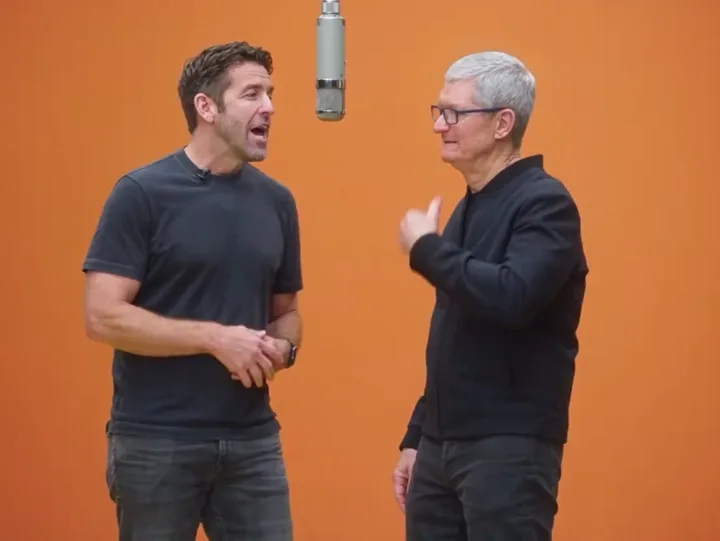
No timeline. No complicated prompt. Just two faces and a little imagination.
Choose a clear, front-facing photo of each person. Even lighting and an unobstructed face work best.
Place each person on the left or right. The Hotel Lobby template brings the studio and duo framing.
Submitted photos and the completed video need content review. Once released, check the full clip before sharing; faces and motion may vary.
The appeal of a Migos AI video is the casting: two familiar faces sharing one performance. The Hotel Lobby look pairs a warm studio backdrop, a microphone, and coordinated movement. A portrait supplies the identity reference; the performance template guides the scene. That combination gives you a starting point for a playful duo edit without filming both people together.
For your Migos AI setup, choose one recent, sharp portrait of each person. Keep the eyes, nose, mouth, and jaw visible, with enough space around the head. Similar camera angles and soft lighting make the references easier to compare. Avoid sunglasses, strong beauty filters, motion blur, and photos with several faces. Use the original image when possible, rather than a screenshot of a compressed social post. Check the left and right slots before moving on.
A Migos AI trend edit can start with best friends, a couple, or siblings who share the same sense of humor. Think about the audience before choosing the pair: an inside joke for a group chat needs a different caption from a birthday greeting. The recognizable faces should carry the idea. Ask both people before using their photos, and make clear that the performance is AI generated when you share it.
Review your Migos AI video from beginning to end. A convincing opening frame does not guarantee stable faces during movement. Look for changing facial features, identities switching sides, unusual hands, or clothing that flickers. Pause when the performers turn or overlap. If you try another version, change one portrait at a time so you can tell what helped. Treat each result as a creative interpretation, with room for variation.
For a Hotel Lobby AI video, decide where the finished clip will be watched. A wide frame gives both performers room; a vertical frame suits a phone screen but needs a careful check of the edges. Keep captions away from faces. If you arrived searching for the Migos AI song, the soundtrack guide below explains the Hotel Lobby connection. Music rights are separate from video generation, so choose an available, permitted track before publishing.
For the Migos AI song connection, Hotel Lobby (Unc & Phew) is a single by Quavo and Takeoff. Song credits are documented in the label’s release announcement: Universal Music Brasil.
Sign in to create a duo video with two permitted adult portraits and 10 credits. Submitted photos and the resulting video need manual review. The examples from AIReel illustrate the intended style and are not results generated by this site.
Content reviewed:
Photo advice, a guide to the two-person trend, and the Hotel Lobby soundtrack.
Make a 5-second, 720p silent duo clip from two portraits. Check the 10-credit cost, manual review, framing, and separate music-editing step.
Read guideUnderstand the Migos AI trend and troubleshoot swapped faces, poor likeness, awkward movement, and missing music in a two-person edit.
Read guideFind the Hotel Lobby track by Quavo and Takeoff and learn how to add music to a silent duo clip. Adding a song does not create lip sync.
Read guideLearn how Genjutsu AI motion transfer differs from a two-photo Hotel Lobby edit, prepare your portraits, and start a duo performance video.
Read guideStart with a one-time credit pack, or choose optional monthly billing. Each five-second, 720p duo video without audio costs 10 credits. All plans use the same generation settings.
$4.99
Pay once. No automatic renewal.
30 credits
Enough for 3 videos
$9.99
Pay once. No automatic renewal.
70 credits
Enough for 7 videos
$19.99
Pay once. No automatic renewal.
160 credits
Enough for 16 videos
Credits with the earliest expiry are used first. Each new generation request costs 10 credits. Confirmed technical failures and rejected requests return charged generation credits.
One-time packs never renew. Monthly plans renew automatically until cancelled in Settings → Billing; cancellation stops future renewals. Photos and videos require manual review.
Checkout is temporarily unavailable. Please try again later or contact support.
About Migos AI, your photos, and the Hotel Lobby video format.
Migos AI video is a popular name for AI clips inspired by the Hotel Lobby duo performance. Two uploaded photos become the visual references for a two-person studio scene. This site is an independent creative tool.
Yes. Add one clear image per performer. You can swap the left and right positions after uploading. Front-facing portraits with one visible face give the clearest references.
Yes. Sign in, buy credits, select two permitted adult portraits and submit your request. Photos are uploaded to private storage. Both inputs and results undergo manual review, so your video is not available immediately. You can return to check progress.
Original song rights are not included. When sharing a video, add music from your social platform’s licensed library where permitted. Reference previews are muted by default.
Each five-second, 720p video without audio costs 10 credits. One-time packs cost USD $4.99 for 30 credits, $9.99 for 70 credits, or $19.99 for 160 credits. Credits expire 365 days after payment and do not renew automatically.
Use a sharp, well-lit portrait without sunglasses or heavy filters. Avoid cropped faces and group photos. AI can alter details, so always review both faces and the motion before sharing.
Pick the photos. We’ll set the scene.